Peer Review
Peer Review will work a little bit differently because you are working in groups. First, be sure that anyone with the link can access your Google Doc:
Once you click the blue “Share” button in the upper right hand corner, 1) change “Restricted” to “Anyone with the Link” 
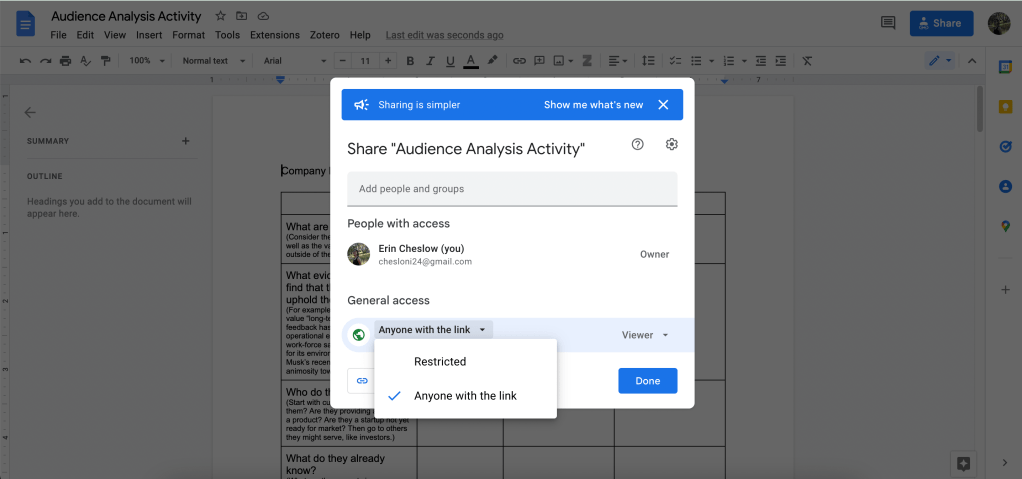
and 2) change “Viewer” to “Editor” before clicking “Copy Link” and pasting the link into the draft forum. Only one person in the group needs to share the link.


To review another group’s draft, schedule a time when you can all work together to comment on the draft. You do not necessarily need to meet on Zoom; Google Docs has a chat feature you can use to discuss your recommended changes and questions as you go. When you meet, open the other group’s Google Doc as a group and respond to annotations as usual. You do not need to repost the link; just respond to the other group’s post letting them, and me, know that you are done giving your feedback. I will also let you know when I have completed my feedback.
You will need to go through this process for the Research Proposal Draft Forum and the SWOT Report Draft Forum.
 Erin Cheslow